Comparison · Trading journals
A TradeZella alternative for options traders

Sergio · · 8 min
I was subscribed to TradeZella until April 2026. I didn't leave because it was bad —it isn't— but because I sell puts and covered calls, and a journal sold to the active trader —day trading and swing— doesn't answer the questions I ask myself: how much premium I've collected this month, what these assigned shares really cost me, and whether this whole cycle has been worth it. I ended up building my own tool. This is what I was missing, told with what can be checked.
First things first: TradeZella is well made
I'm starting here because if this were a list of someone else's flaws you wouldn't trust it, and you'd be right. TradeZella has 4.8 out of 5 from more than a thousand reviews on Trustpilot and calls itself the number one trading journal; its own homepage talks about more than a hundred thousand traders. It syncs with Interactive Brokers via Flex Query and, since summer 2026, trades come in the same day. It supports options as an asset class, has a days-to-expiration report, contract charts and a setting that, if you turn it on, automatically closes options that expire.
If you day trade stocks or futures, it's a serious product and this guide probably isn't for you. The problem isn't quality: it's where its shop window points. What its homepage shows is tick-by-tick session replay, backtesting, prop firm sync and monitoring of daily drawdown and R-multiple; its options page is titled «Options Day Trading Journal». That's active directional trading, and someone who sells premium needs something else.
What was happening to me
I sell puts and, when I get assigned, I sell covered calls on top. It's the wheel: puts on stocks you wouldn't mind owning and calls on top until they're called away. A trade of mine isn't an entry and an exit: it's a chain that can last months, with premiums collected along the way, an assignment in the middle and shares that end up being worth something different from what the broker says.
With the journal in front of me, every month I asked myself the same questions and none of them had an at-a-glance answer. These five, specifically.
1. Seeing the wheel as a cycle, not as separate trades
A sold put, an assignment, three covered calls and a final sale are six different entries in a normal journal. I wanted to see them as what they are: a single story about one stock. Its help center only exists in English, so I searched in English: «wheel» returns no article in its help center, no request on its public board and none of its more than a thousand Trustpilot reviews; «covered call»doesn't return any product article either.
2. The cost basis after an assignment
When you're assigned on a put, the broker books the shares at the strike price. But you collected a premium for accepting that commitment, so your real cost is lower— and the cost of the whole wheel lower still, because every covered call you sell afterwards lowers it again. That number is the one that decides whether selling at a given price is a gain or a loss. In TradeZella's documentation the cost methods that appear are the classic ones —FIFO, LIFO and weighted average—; subtracting collected premiums doesn't appear.
3. A spread being one position, not four trades
This is the one point where nothing needs interpreting, because its own users say it on its public board: there are nine open requestsabout spreads and multi-leg strategies, from June 2025 to February 2026, and none has an official response. In the most voted one —August 2025, thirteen votes, still open— its author describes what they see today: only the entry and exit price of the long leg. There is an option to merge trades by hand, with conditions. Automatic, in its documentation, nothing appears. And in the CSV template they document themselves, the only value provided for an option is «Single»: there's no column that groups legs into a strategy.
4. Rolls
When I roll a put —I close it and open another with a different strike or expiration—, for the journal that's two trades: one that closes and one that starts. For me it's the same position, a month later. Linking rolls doesn't appear documented either.
5. How much premium I've collected, net, this month
The simplest question of all and the one with the worst answer. The only options analytics documented in its help center is a days-to-expiration report; of premiums collected per month, net of commissions, nothing appears documented.
Why I ended up building something else
Tortuga wasn't born as a product: it was born as a tool for me. I was paying a subscription to a journal that didn't answer the five questions above, so I set about building what I was missing. For a while it was only mine. Then it stopped being so.
I mention it because it explains the gaps as much as the strengths: Tortuga does four things I needed very well, and doesn't do others that are standard in TradeZella. That list is further down, with no embellishment.
What Tortuga does with a wheel
These four are built and I use them myself. I also say how far they go, because the same yardstick I used out there has to apply in here.
- The real cost of the shares you hold. As long as the stock stays in your portfolio, Tortuga starts from the cost basis IBKR gives you and applies the result of each option you sold on it and have already closed: collected premiums lower it and a roll bought back at a loss raises it, just like in your account. It's the central calculation of my whole approach and it has its own guide with the numbers: what your average price looks like after an assignment.
- Multi-leg strategies are recognized automatically. From the imported legs, with the same expiration, Tortuga names the position: verticals, iron condor, iron butterfly, box, jade lizard, ratios, synthetics and a few more. Nothing to merge by hand.
- Premiums, net and grouped.What you've realized when you close each strategy, with commissions already subtracted, by position and by month. With a caveat I'd rather tell you before you discover it: the premium counts in the month you closethe option, not the day you collect it. A put you sold in September that is still open doesn't count towards September yet.
- In Spanish (and English) and on IBKR.It syncs with your Flex Query without you touching a CSV, and the interface is in Spanish because that's the language I keep my books in, and it's also available in English. Strategy names stay in English: an iron condor is called iron condor, not «cóndor de hierro».
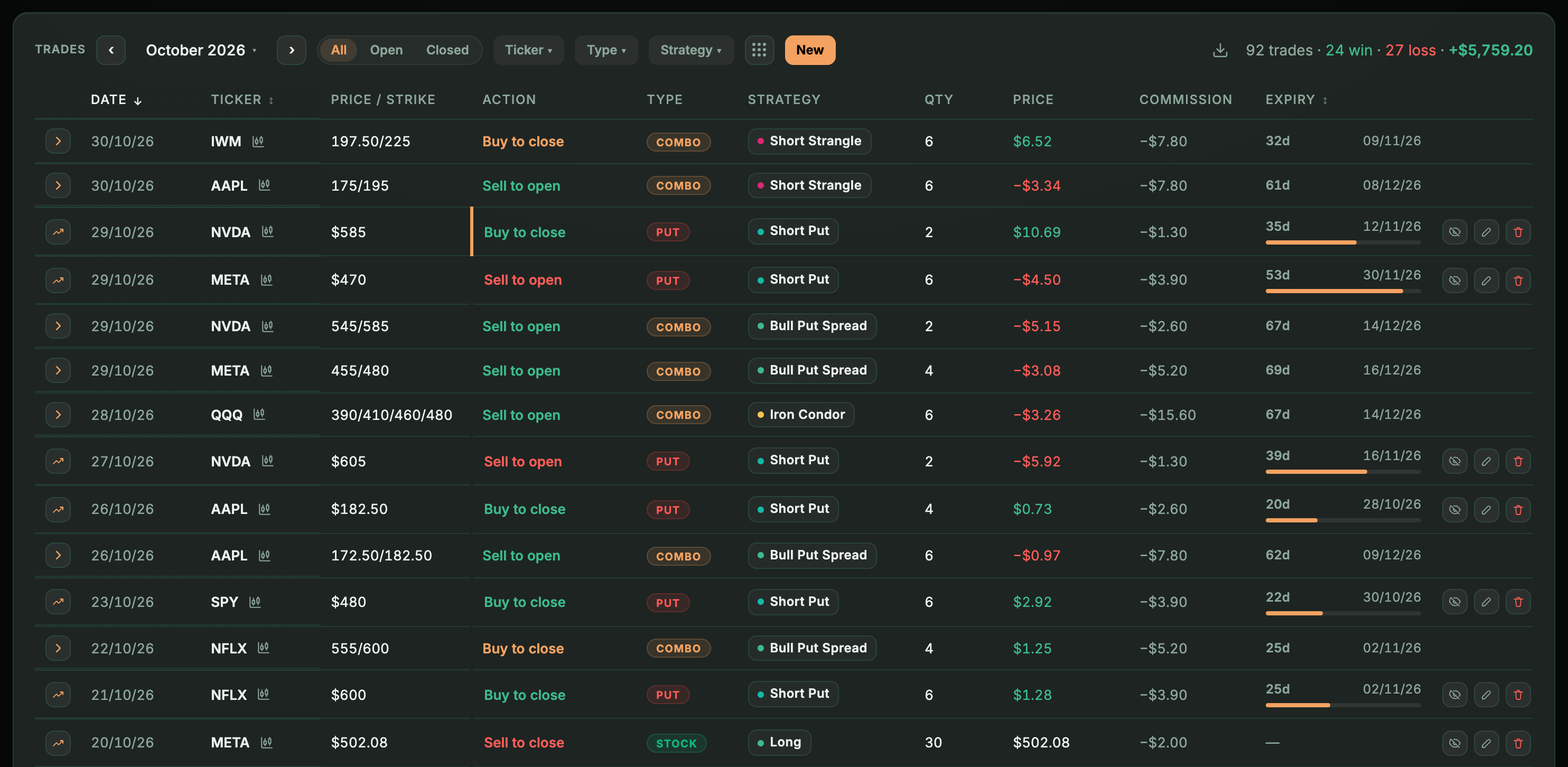
On the wheel I should be precise, because it's the reason I started all this: Tortuga has no «wheel cycle» entity with its own label. What it has is a per-underlying view that brings together all the options sold on that stock and marks the assignment as a milestone along the way, with the updated cost. In practice it answers the question; strictly speaking, it isn't a wheel detector. How I track the cycle is in tracking the wheel.
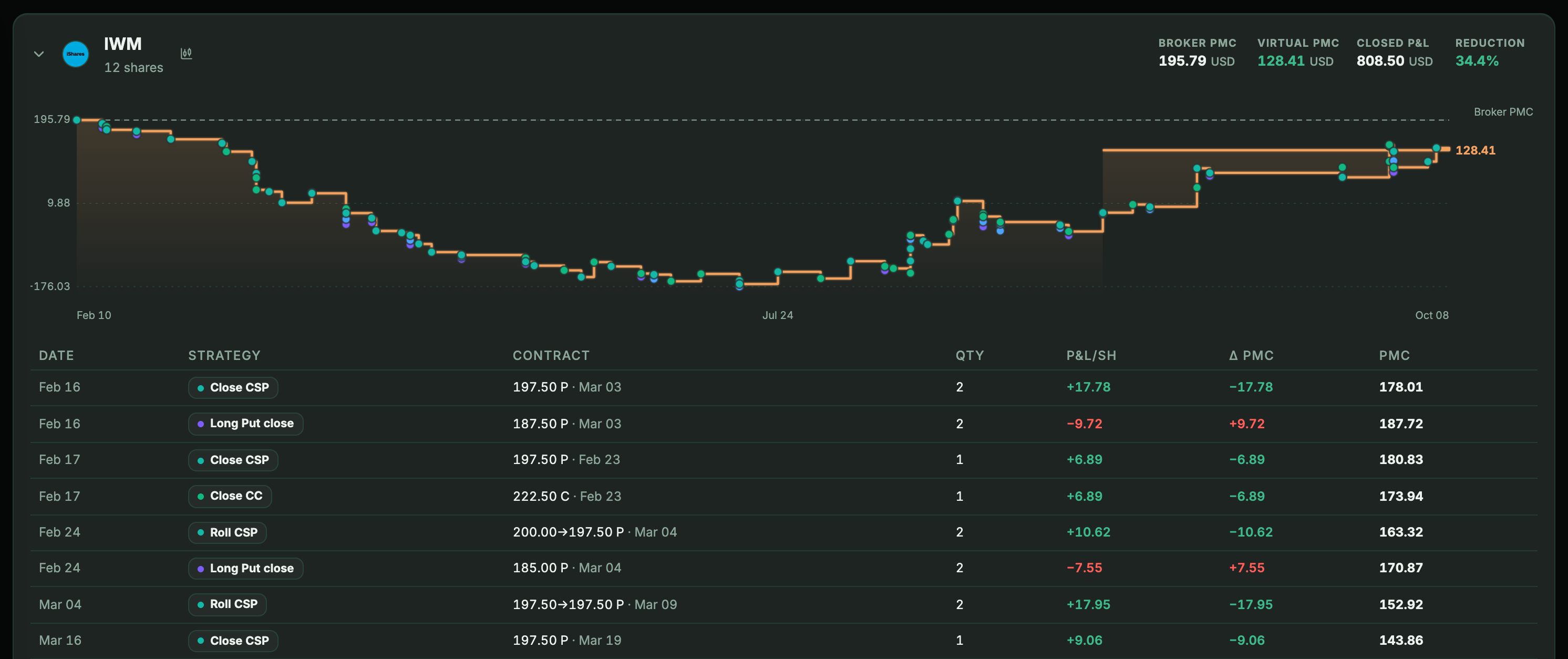
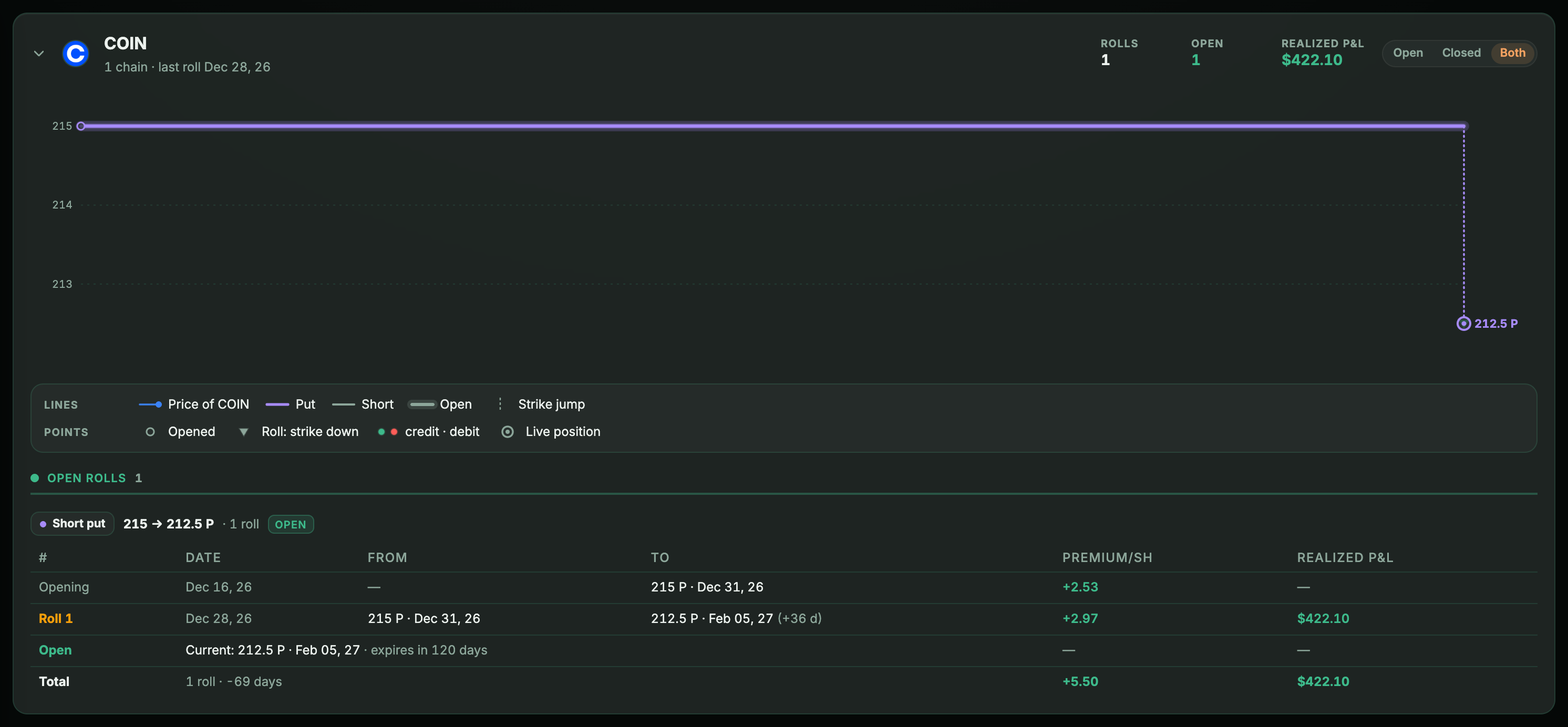
And rolls: the pair is detected —a close and an open on the same day, same underlying, same type and same quantity, as long as there's no other open of the same size on that underlying that day to confuse it with— and marked as a roll. If that position is rolled again, the next roll is chained to the previous one (roll 2, 3…) and the whole chain can be seen from the original opening. What it does not do is pair a doubtful pair: I prefer it that way rather than wrongly pairing two trades that had nothing to do with each other.
The comparison, with what can be checked
| What an options seller needs | TradeZella (public sources, Sep 11, 2026) | Tortuga |
|---|---|---|
| Import from IBKR via Flex Query | Yes, and same day since summer 2026 | Yes |
| Record options | Yes, with expiration report and contract chart | Yes |
| Group spreads and multi-leg automatically | Not documented; nine open user requests since Jun 2025, no official response | Yes, from legs with the same expiration |
| Share cost net of premiums | Not documented (methods: FIFO, LIFO, weighted average) | Yes, while you hold the shares, with each option already closed on them |
| The wheel as a single story | No mentions in its options pages, help center, requests or reviews | Partial: groups by underlying, with the assignment as a milestone |
| Link rolls | Not documented | Yes when the pair isn’t ambiguous: chains them from the opening |
| Net premiums per month | Not documented (only days-to-expiration report) | Yes, net and by strategy; they count when the option is closed |
| Language | English | Spanish and English |
When TradeZella is a better choice than Tortuga
If any of this describes you, stay where you are — or go back there:
- You day trade stocks or futures. Tortuga is designed for people who hold positions for days or months, not for someone who makes twenty trades in a session.
- You want to review your entries on the chart, with session replay and annotations on top. We don't have that.
- You're looking for playbooks or backtesting.Tortuga doesn't have them: neither built nor announced. For the AI copilot there is a screen that says «coming soon», but with no date. I'd rather tell you here than let you find out inside.
- Your broker isn't IBKR. From IBKR and tastytrade we also import options; from DEGIRO, ING, Trade Republic and MyInvestor we import stocks, ETFs and funds, not options. And automatic sync, with no CSV in between, is currently only available for Interactive Brokers.
If you're considering switching
The honest test takes an afternoon: connect your Flex Query, let your history come in and open Options › Underlyingson a stock you hold today and on which you've already closed at least one sold option. If, when you see it grouped —with the closed premiums and the corrected cost— you think «this is what I was writing down by hand», then Tortuga is your tool. And if not, that's fine: what matters is that you keep records somewhere.
If you haven't been assigned any shares yet, or you've already sold the ones you had, that view will be empty: it follows the positions you have open, not the closed history. It doesn't mean the import failed — your premiums, month by month, are there from day one in Options › Analysis, and each contract in the trades table.
Start here if you're starting from scratch: how to get your trades out of IBKR with a Flex Query. And if you want to compare more tools or you're looking for TradeZella in Spanish, it's in TradeZella in Spanish.
Keep reading
- TradeZella in Spanish: what exists and what your alternatives areTradeZella is not available in Spanish. What that means in practice, what “free TradeZella” really means, and how to choose a trading journal if you trade with IBKR.
- How to track the wheel strategy: premiums, assignments and cost basisThe wheel takes five minutes to explain and three months to get out of hand. What to record on each turn to know whether you are really making money.
- How to calculate your cost basis after a put is assignedYou were assigned and your shares are worth less than you paid. The real number subtracts the premium you collected, and almost nobody gets it right.